
The full platform · Enterprise
A transport management system that runs the whole delivery, whoever carries it.
Rapid Express is one platform with two channels: your own fleet and your external carriers. Orders come in once, move one way or the other, and end up with the same tracking, the same proof of delivery and the same history.
One transport platform
Two ways to move freight. One place to run it.
Some deliveries belong on your own fleet. Others belong with a carrier. The platform treats both as consignments in the same orders board, with the same tracking and the same proof of delivery.
Channel one
Own fleet
- Dispatch Center
- Route optimisation
- Driver app and scanning
- Fleet Live tracking
Channel two
External carriers
- Multi-carrier quotes
- Your booking rules
- Labels and manifests
- Carrier tracking
What you get
Operational visibility
- One orders board for the day
- Open orders aged against ETA
- One tracking page per consignment
- Proof of delivery in one place
How it works
From order to proof of delivery, in five steps.
Every step below is a screen your team already knows from running a depot. The platform keeps them in one place.
01
Create or import
Book an order by hand, pull it from your ERP, or let a connected system create it.
02
Decide how it moves
Put it on one of your own runs, or let your booking rules pick the carrier.
03
Dispatch or manifest
Sequence the run and send it to the driver's app, or print labels and close the carrier manifest.
04
Track
Own-fleet runs and carrier consignments sit on the same open-orders board, aged against their ETA.
05
Complete
Proof of delivery, scans and carrier events land on the consignment and on the customer's tracking page.
Driver app
Scan it on. Scan it off. Prove it was delivered.
Drivers open their run, load-check every carton by barcode, navigate stop by stop, and close each delivery with a photo, a signature and the receiver's name. Position is sent in the background while the run is active, so Fleet Live and the ETAs stay honest.
- iOS and Android
- Load check and delivery scans per carton
- Manual entry when a barcode will not scan, recorded as such
- Photo, signature and receiver name
- Ad-hoc stops added on the road
- Push notifications for new work
Load check
Run BNE-AM · Stop 4
- RE0000431 · 1 of 4Scanned
- RE0000431 · 2 of 4Scanned
- RE0000431 · 3 of 4Keyed in
- RE0000431 · 4 of 4Waiting
Proof of delivery
Harbourside Plumbing
3 Template Parade, Virginia
Signature
Illustrations of the driver app. Real screens are shown during the demo.
Route planning
The order of the stops, decided before the van moves.
Drop the day's consignments onto a run and the planner sequences them by distance and time. Stops you pin stay where you put them — a first delivery that has to be first, a customer who only receives after ten. Everything else re-sequences around them.
Optimise, then lock
Re-sequence as many times as you like while planning. Once the driver starts, the run is locked so the sheet in the van and the screen in the office never disagree.
Pinned stops are respected
Time windows and must-be-first deliveries hold their place. The optimiser works around them instead of overruling them.
Booked and planned on the same board
A consignment becomes a stop on a run or a booking with a carrier from the same list. The decision is per consignment, by your rules.
Carried in the driver app
The sequence the office planned is the sequence the driver sees, stop by stop, with navigation handed to the phone's own maps.
Automation
Less typing at the freight desk.
The sales order fills the booking. Your rules pick the carrier. The presets know your cartons. The customer gets an email with the tracking link. Nobody re-keys an address.
- Customer
- Bayview Kitchens
- Deliver to
- 144 Example Street, Milton QLD 4064
- Contact
- Reception · 0491 570 159
- Items
- 3 cartons · 12.4 kg
Address, contact and items filled from the sales order. Nothing retyped.
3 cartons · 24 kg · Brisbane to Sydney
- Direct FreightAuto-bookNext day · AU$28.40
- PhoenixNext day · AU$31.90
- StarTrackSame day · AU$44.10
- XFM2 days · AU$61.00
Rule: book the cheapest next-day service unless the order is marked urgent.
Your delivery is on its way: RE0000433
Rapid Express Deliveries · today
Hi Summit Air Conditioning, your order SO-10433 is on the van and due today.
Track your delivery- Sent once, when the run starts
- Tracking link inside
Fulfilment from your ERP
Type the sales order number and the customer, address, contact and items come across from Cin7. Nothing is retyped.
Quote to booking, automatically
Set the rule once. The platform quotes every connected carrier and books the one that fits: cheapest, fastest or your own preference.
Presets for speed
Your standard cartons and pallets are one tap in booking and quoting, and the order's items suggest the parcels.
Scanner-first
Scan the label and the consignment opens with its details. Scan the carton and it is on the run.
Rules and coverage
Your carriers, your contracts, your rules. Set in Settings, per branch.
Every business ships differently, and every carrier contract is its own deal. The rules engine is yours to shape: which carrier serves which area from which depot, what wins when two could, and what happens when none should. Change it when a contract changes.
Rules per branch and per carrier
Each depot keeps its own rule set. A postcode range, a weight, a pallet, an urgent flag: each can decide the carrier.
Coverage you control
Which carriers serve which areas, from which branch. Switch a carrier off for a region without touching anything else.
Your contracts, your rates
Every carrier is connected on your own account. Rates and terms stay between you and the carrier; the platform just applies them.
Anything specific, built with you
A rule that does not fit the settings screen is scoped and implemented as agreed. The engine is ours to extend.
Rules, in order
- 1If Postcodes 4000 – 4179 → Own fleet · Rapid Brisbane
- 2If Any pallet → XFM
- 3If Over 25 kg, interstate → Direct Freight
- 4If Marked urgent → Fastest available
- 5If Otherwise → Cheapest next-day
Coverage from this branch
Brisbane metro
Own fleet, Direct Freight, Phoenix
Regional QLD
Direct Freight, StarTrack
Interstate
Direct Freight, StarTrack, XFM
Your contracts and rates stay with your carriers. The platform only applies the rules you set here, per branch, and anything more specific is built with you.
Data you can trust
Standardised on the way in. Reconciled on the way out.
Most freight errors are typing errors, and most overcharges are never noticed. The connections fill the booking from your own sales order, the coverage rules check the destination before it is sent, and the carrier's invoice is matched back line by line to what you booked.
Standardised on the way in
Customer, address, contact and items arrive from your sales order already mapped onto the booking. Nobody re-keys an address, so nobody mistypes one.
Checked before it is booked
Coverage rules say whether a carrier serves that postcode from that depot before the booking goes out, instead of after the carrier rejects it.
Presets instead of guesswork
Your cartons, satchels and pallets are saved with their real dimensions and weight, so a quote is a quote and not an estimate.
Reconciled against the invoice
Carrier invoices are matched line by line to the consignments you booked. What was charged above the quote is surfaced for a credit claim.
To recover
AU$18.40
Invoice INV-100284 · 4 lines
| Connote | Quoted | Invoiced |
|---|---|---|
| DFE41559335 | 96.72 | 96.72 |
| DFE69290734 | 104.67 | 123.07 ▲ |
| PHX21764230 | 98.99 | 98.99 |
| STE73126420 | 74.83 | 74.83 |
Three lines matched inside tolerance and were approved. One is queued for a credit claim.
Freight reconciliation
The carrier invoiced what it quoted. Prove it, line by line.
Overcharges are rarely disputed because nobody has time to check three hundred lines against three hundred bookings. The module does the checking and hands your team only the lines that are actually wrong — and you decide what "wrong" means.
- Import the invoice
- Drop the carrier's CSV in, preview it before it lands, and the same invoice number cannot be imported twice.
- Matched on identity, not on price
- Each line is matched to a consignment by connote, then by the carrier's own reference, then by your order reference. A price difference never hides a line: it becomes a review, not an orphan.
- Tolerance you set
- A dollar amount, a percentage, or both. Set one default and every carrier inherits it, then override the one carrier whose contract is different.
- Auto-accept the noise
- Lines inside tolerance approve themselves, with an optional ceiling so nothing large is ever waved through. Your team only opens what is actually in dispute.
- Dollars at risk, on the dashboard
- Lines imported, auto-approved, needing review, and unmatched — with the total overcharge still open beside them.
- Export the claim
- Accept, dispute or reject each line, then export the disputed ones as a file to send to the carrier.
Analytics and finance
Know what freight costs, branch by branch, carrier by carrier.
Volume, cost per consignment, what moved between depots, and whether the carrier invoiced what it quoted. The numbers your finance team asks for, without a spreadsheet in between.
Consignments by branch · last 30 days
Cost per consignment
↓ trending down
Stock moved between branches · this month
- Brisbane → Gold Coast42
- Brisbane → Sydney27
- Gold Coast → Sunshine Coast15
- Sydney → Melbourne9
To recover
AU$18.40
Invoice INV-100284 · 4 lines
| Connote | Quoted | Invoiced |
|---|---|---|
| DFE41559335 | 96.72 | 96.72 |
| DFE69290734 | 104.67 | 123.07 ▲ |
| PHX21764230 | 98.99 | 98.99 |
| STE73126420 | 74.83 | 74.83 |
Three lines matched inside tolerance and were approved. One is queued for a credit claim.
Analytics
Volume by branch, carrier mix, cost per consignment and delivery performance in one place.
Branch transfers
What moved between your depots, how often and at what cost.
Freight reconciliation
Carrier invoices matched to consignments; overcharges surfaced for a credit claim.
Own-fleet cost analysis
What your runs cost against what a carrier would have charged for the same stops.
Rapid Portal · assistant
Ask the question. Get the number, and the table it came from.
The dashboard tells you freight went up. The assistant tells you why, by crossing the transport data with the sales and stock data in the same answer — the question that used to cost someone an afternoon in spreadsheets.
Freight was $37,565, up 17%. Newcastle drove almost all of it: express bookings tripled while stock sat in Bendigo.
Figures invented for a business that does not exist. Every real answer runs a vetted query and shows the table it came from.
Gross margin · last quarter
- Newcastle34.2%
measured on 91% of billed revenue
- Geelong29.7%
measured on 88% of billed revenue
- Bendigo21.4%
measured on 46% of billed revenue
Invented figures. Bendigo is the warning the coverage column exists for: not enough of that revenue has a cost recorded to trust the percentage.
Ask in plain English
Sales, margin, stock and freight across both systems, answered in one question instead of four reports.
Every answer shows its table
The figures come back as a sortable table you can chart or download. If the words and the table disagree, the table is the measurement.
Vetted queries only
The assistant picks from queries written and reviewed by hand and runs them read-only. It never writes a query of its own.
No plausible guesses
A question the catalogue cannot answer gets told so, with the nearest question it can answer. It never invents a number.
The monthly review, live
Sales by branch, margin with its coverage, freight by carrier and what to reorder, drawn from the data each time the page opens.
Asked and answered, on record
Who asked what, which queries ran and what it cost are kept in an audit trail. The answers themselves are not stored.
The figures in the two panels above belong to a business that does not exist. They are there to show the shape of an answer, not a customer's numbers.
Customer experience
Keep customers informed without creating more work for your team.
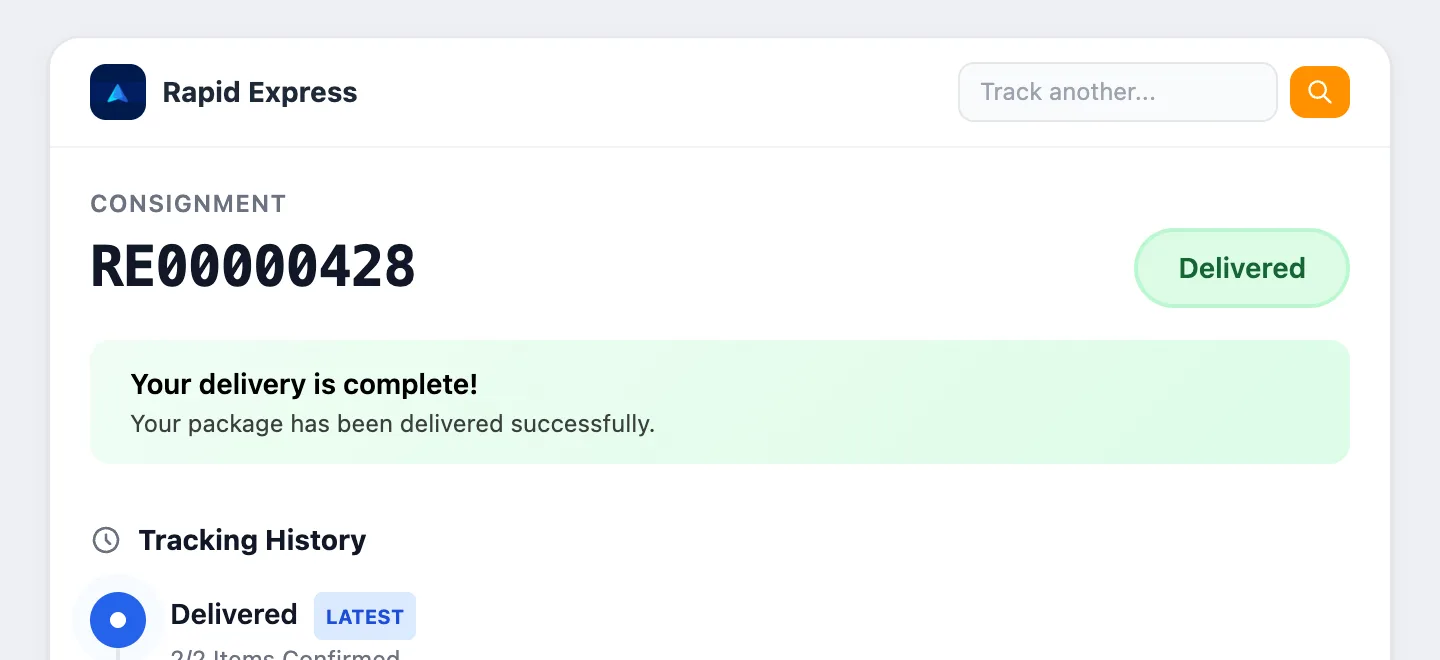
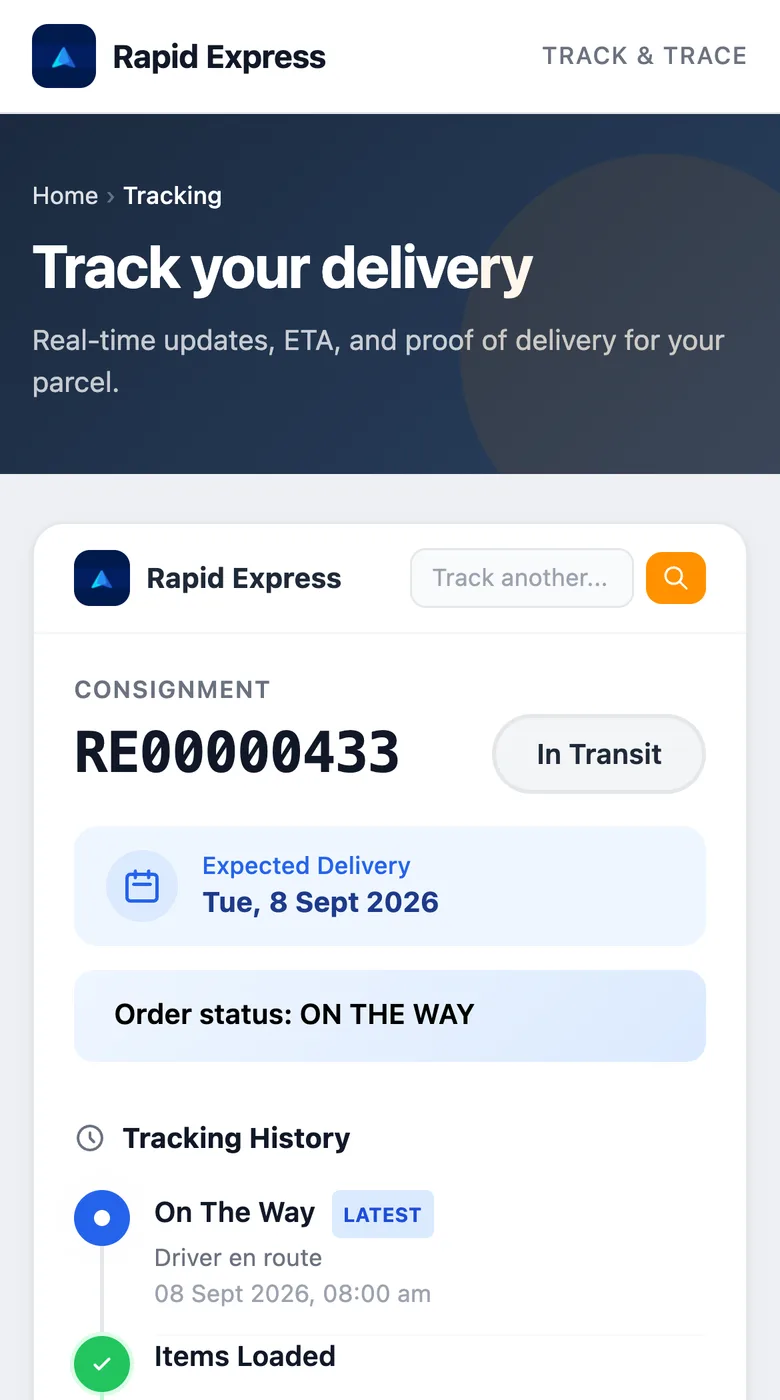
Every consignment has a public tracking page. It shows the status, the expected delivery date, each scan and, once delivered, the proof: photo, signature and who signed. Share the link and the phone stops ringing.
- Every delivery your fleet makes gets one; carrier consignments too, on Enterprise.
- An email with the tracking link the moment the run starts.
- No login for the customer, and no phone number or instructions ever exposed.
Operational visibility
Fewer calls between the office and the road.
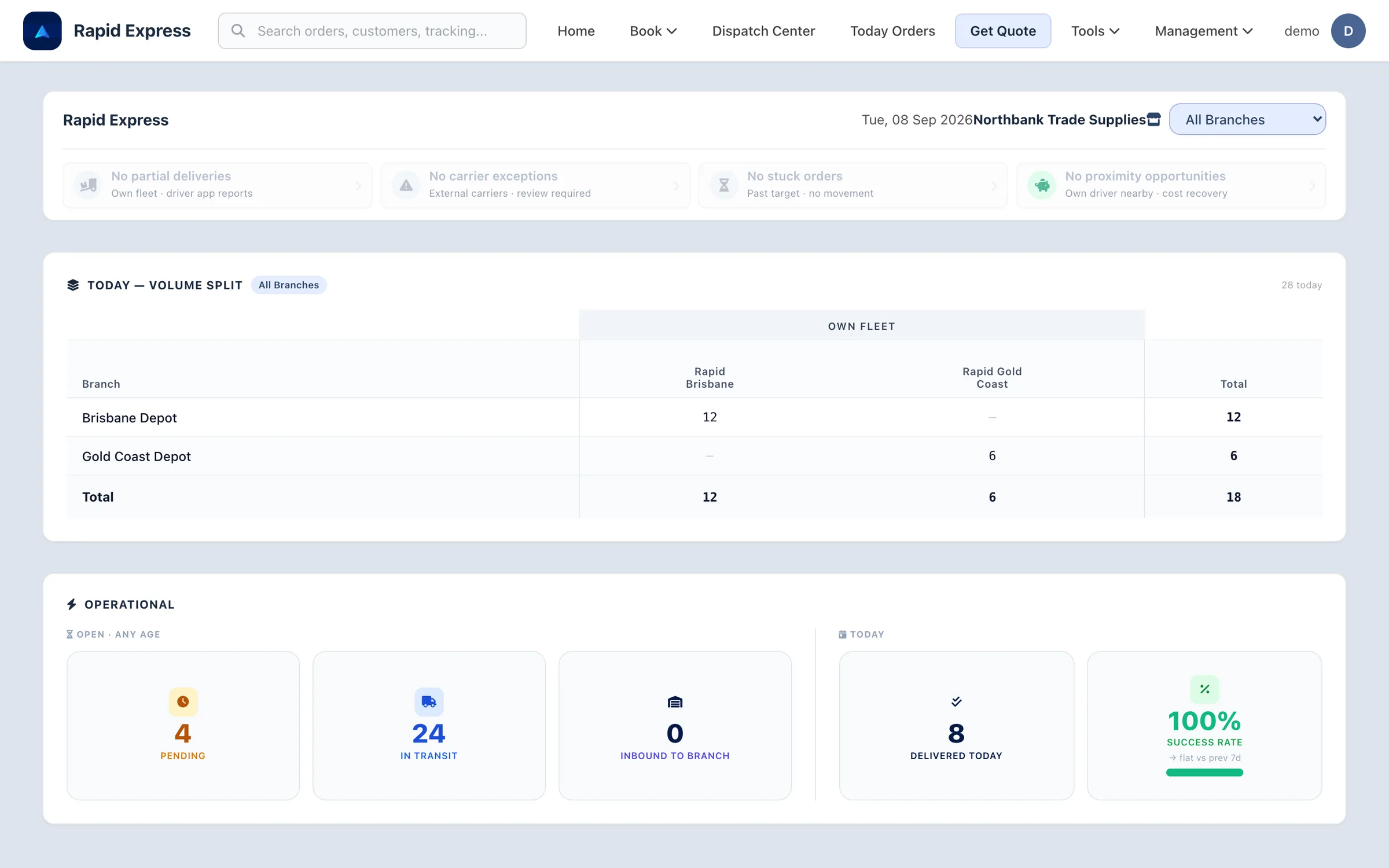
The dashboard opens on today: what is pending, what is moving, what is delivered, and which consignments need someone's attention. Drill into any number and you land on the screen that resolves it.
Searchable proof of delivery
Photo, signature and receiver name live on the consignment. A dispute is a search, not a call to the driver.
Exceptions in their own queue
Carrier exceptions and own-fleet partial deliveries surface on the dashboard the moment they happen.
Everything in one history
Runs, stops, scans, carrier events and reconciliation results are kept against the order for as long as you need them.
Connections
We build the connections. You keep your accounts.
Carriers, your ERP, an online store or a warehouse system: every connection is built and maintained by us, on the accounts you already hold. Nothing to configure on your side beyond the credentials you choose to share. Part of the Enterprise plan.





Operational controls and scale
Who can do what, in which branch, on record.
One company or nine depots, the platform is the same: people are scoped to the branches they work in, and access is granted per module and per action. Seeing a screen and committing a change are different permissions, so office staff, finance or a customer's own team can be given a view without the ability to change anything. Every sign-in and permission change is written to an audit trail.
One login for every module
Staff sign in once and see only the systems they have been granted.
Roles and per-user permissions
Viewing a screen and committing a change are separate permissions, and a deny always wins.
Audit trail
Sign-ins, permission changes and module crossings are recorded with time, IP and user agent, in Brisbane time.
Companies and branches
Scope each person to the company and branches they work in.
Read-only access
Office staff, finance and a customer's own team can be given screens to watch without the ability to change anything.
Warehouse module
Rapid Labels: the depot side of the same operation.
For businesses that also run stock, a companion warehouse module covers labels, transfers, cycle counts, replenishment and picking accuracy, behind the same sign-in. Scoped per engagement rather than sold as a plan.
Label printing
Product, location and manual labels, plus label sheets.
Stock transfers
Draft, edit and complete transfers between branches.
Cycle counting
Count locations and commit the variance to stock.
Pick anomalies
Picks where what left the bin did not match the order.
Branch replenishment
Suggested moves between branches, committed on demand.
Returns
Log what came back, from whom and in what condition.
Own fleet when it makes sense.
External carriers when they make sense.
One system either way.
A local run goes on a van. A pallet to Perth goes with a carrier. Your team makes that call per consignment, on the same screen, and the customer gets the same tracking page whichever way it travels.
Ready to run your fleet from one screen?
Book a demo and we will walk through your depot, your vans and your stops per day, using numbers like yours.