
Carrier Management · Enterprise
Your carriers. One workflow.
Compare rates, book by your rules, label, manifest and track with the carriers you already use, on your own accounts. Every carrier consignment sits next to your own-fleet runs on the same board, so the day is one list, not five portals.
The real thing
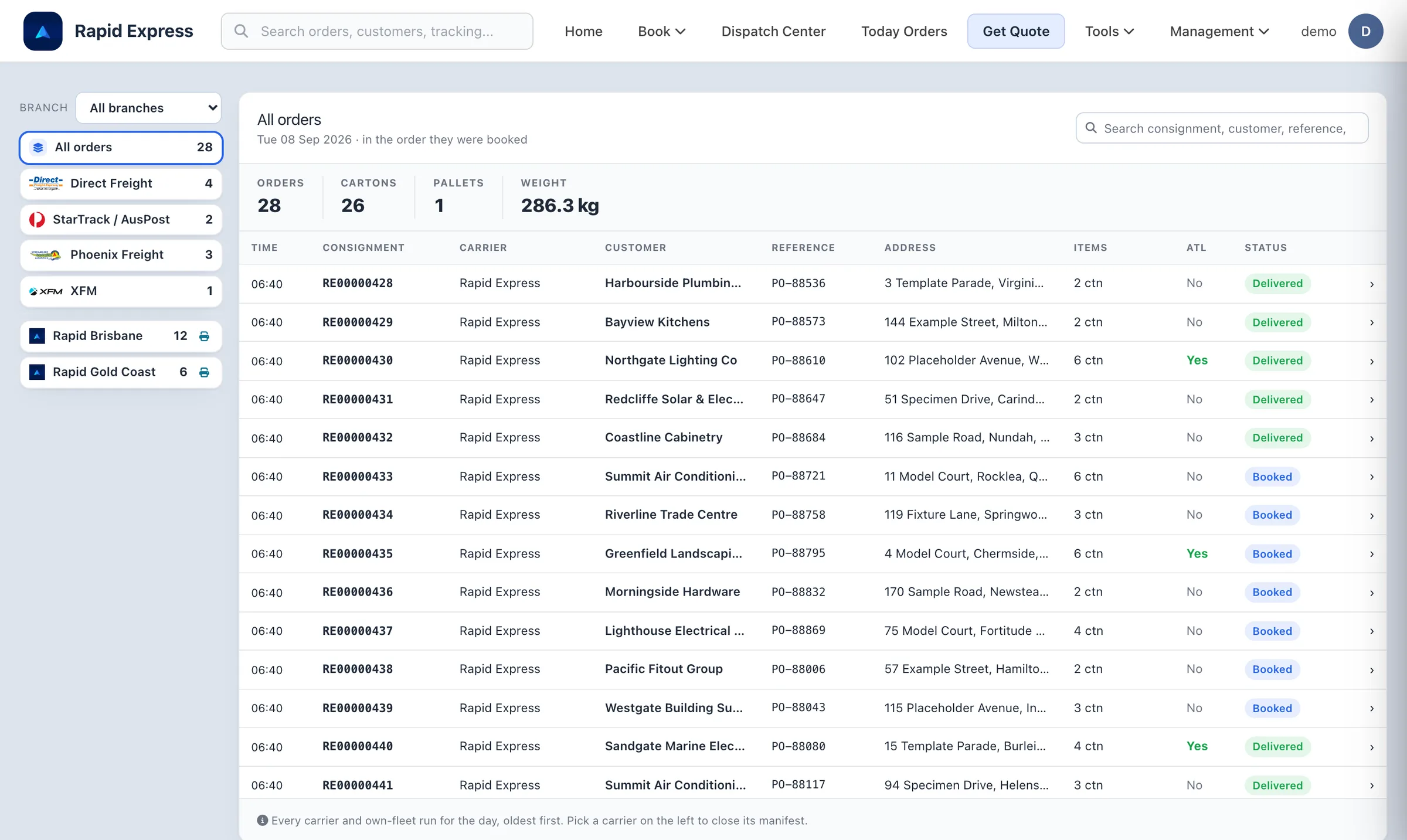
Today's orders board: carriers on the left, own-fleet runs below them, every consignment with its status and charge.
Automation
Less typing at the freight desk.
The sales order fills the booking. Your rules pick the carrier. The presets know your cartons. The customer gets an email with the tracking link. Nobody re-keys an address.
- Customer
- Bayview Kitchens
- Deliver to
- 144 Example Street, Milton QLD 4064
- Contact
- Reception · 0491 570 159
- Items
- 3 cartons · 12.4 kg
Address, contact and items filled from the sales order. Nothing retyped.
3 cartons · 24 kg · Brisbane to Sydney
- Direct FreightAuto-bookNext day · AU$28.40
- PhoenixNext day · AU$31.90
- StarTrackSame day · AU$44.10
- XFM2 days · AU$61.00
Rule: book the cheapest next-day service unless the order is marked urgent.
Your delivery is on its way: RE0000433
Rapid Express Deliveries · today
Hi Summit Air Conditioning, your order SO-10433 is on the van and due today.
Track your delivery- Sent once, when the run starts
- Tracking link inside
Fulfilment from your ERP
Type the sales order number and the customer, address, contact and items come across from Cin7. Nothing is retyped.
Quote to booking, automatically
Set the rule once. The platform quotes every connected carrier and books the one that fits: cheapest, fastest or your own preference.
Presets for speed
Your standard cartons and pallets are one tap in booking and quoting, and the order's items suggest the parcels.
Scanner-first
Scan the label and the consignment opens with its details. Scan the carton and it is on the run.
Rules and coverage
Your carriers, your contracts, your rules. Set in Settings, per branch.
Every business ships differently, and every carrier contract is its own deal. The rules engine is yours to shape: which carrier serves which area from which depot, what wins when two could, and what happens when none should. Change it when a contract changes.
Rules per branch and per carrier
Each depot keeps its own rule set. A postcode range, a weight, a pallet, an urgent flag: each can decide the carrier.
Coverage you control
Which carriers serve which areas, from which branch. Switch a carrier off for a region without touching anything else.
Your contracts, your rates
Every carrier is connected on your own account. Rates and terms stay between you and the carrier; the platform just applies them.
Anything specific, built with you
A rule that does not fit the settings screen is scoped and implemented as agreed. The engine is ours to extend.
Rules, in order
- 1If Postcodes 4000 – 4179 → Own fleet · Rapid Brisbane
- 2If Any pallet → XFM
- 3If Over 25 kg, interstate → Direct Freight
- 4If Marked urgent → Fastest available
- 5If Otherwise → Cheapest next-day
Coverage from this branch
Brisbane metro
Own fleet, Direct Freight, Phoenix
Regional QLD
Direct Freight, StarTrack
Interstate
Direct Freight, StarTrack, XFM
Your contracts and rates stay with your carriers. The platform only applies the rules you set here, per branch, and anything more specific is built with you.
Book and manifest
Close the day per carrier, before the cut-off.
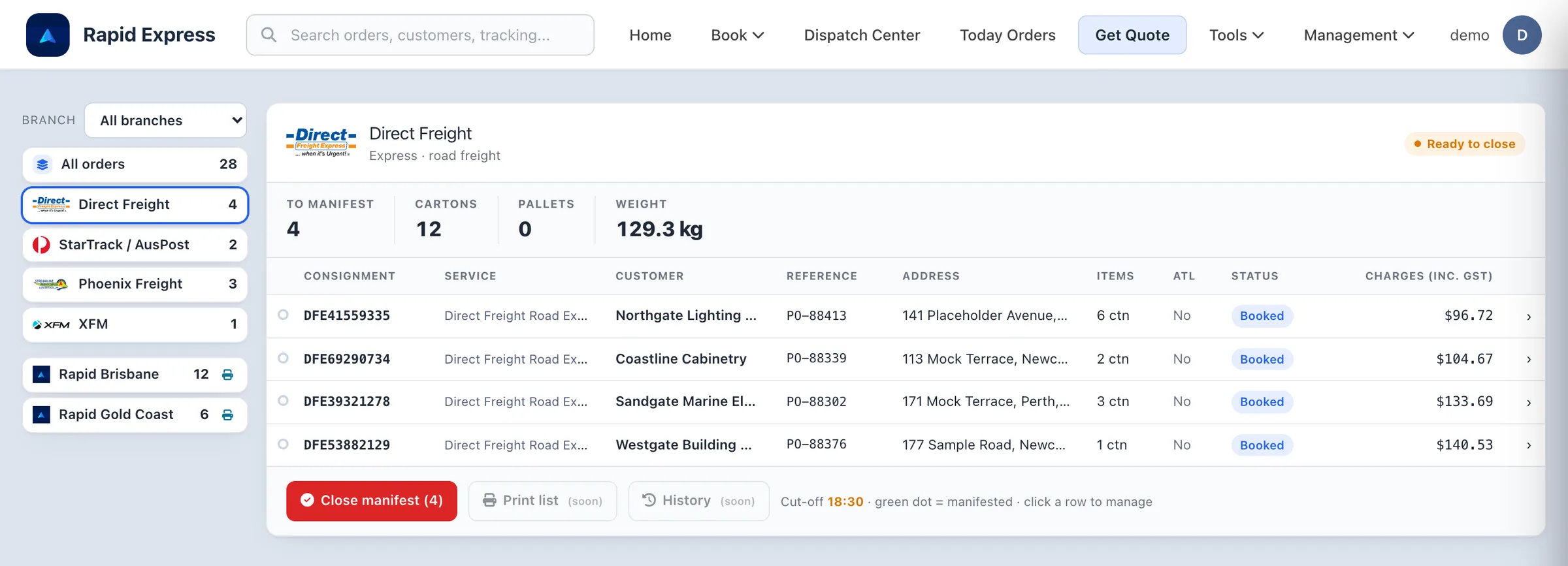
Each carrier has its own group on the orders board: what is booked, how many cartons and pallets, the weight and the charges. Closing the manifest lodges it with the carrier and that record is theirs from then on.
- Labels in ZPL for thermal printers or PDF, per consignment or in bulk.
- Manifests with history and PDF download.
- Cancellations and detail updates go back to the carrier automatically.
Track
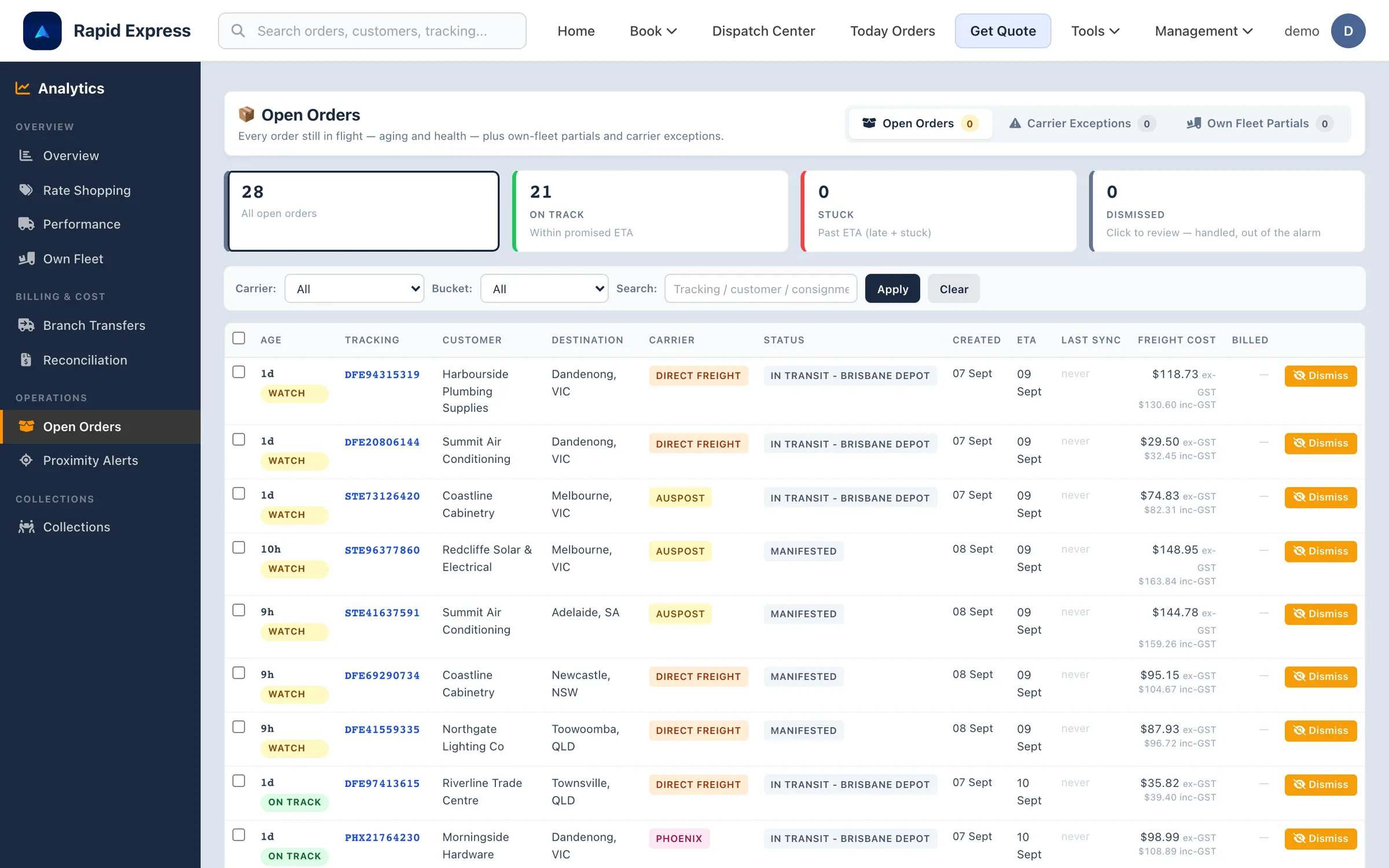
Every consignment in flight, aged against its ETA.
Carrier statuses come back automatically. Open Orders shows what is on track, what needs watching and what is past the promised date, with the freight cost against each line.
- Carrier exceptions and returns to sender get their own queue.
- Dismiss an exception once it is handled offline, and it stays out of the alarm.
- Carrier POD is pulled onto the consignment when the carrier provides it.
Analytics and finance
Know what freight costs, branch by branch, carrier by carrier.
Volume, cost per consignment, what moved between depots, and whether the carrier invoiced what it quoted. The numbers your finance team asks for, without a spreadsheet in between.
Consignments by branch · last 30 days
Cost per consignment
↓ trending down
Stock moved between branches · this month
- Brisbane → Gold Coast42
- Brisbane → Sydney27
- Gold Coast → Sunshine Coast15
- Sydney → Melbourne9
To recover
AU$18.40
Invoice INV-100284 · 4 lines
| Connote | Quoted | Invoiced |
|---|---|---|
| DFE41559335 | 96.72 | 96.72 |
| DFE69290734 | 104.67 | 123.07 ▲ |
| PHX21764230 | 98.99 | 98.99 |
| STE73126420 | 74.83 | 74.83 |
Three lines matched inside tolerance and were approved. One is queued for a credit claim.
Analytics
Volume by branch, carrier mix, cost per consignment and delivery performance in one place.
Branch transfers
What moved between your depots, how often and at what cost.
Freight reconciliation
Carrier invoices matched to consignments; overcharges surfaced for a credit claim.
Own-fleet cost analysis
What your runs cost against what a carrier would have charged for the same stops.
What is included
The whole freight desk, in one place.
Multi-carrier quoting
Enter the parcels once and compare live rates from your connected carriers, filtered by cheapest or fastest.
Booking rules
Your rules, per branch and per carrier: which carrier for which postcodes, weights or pallets, and what to do otherwise.
Coverage management
Decide which carriers serve which areas from each branch, and change it in Settings when a contract changes.
Presets and one-click quotes
Save your usual carton sizes and weights, and quote a repeat order in seconds.
Labels and manifests
Thermal labels in ZPL or PDF, and end-of-day manifests closed per carrier from the orders board.
Carrier tracking
Statuses come back from the carriers automatically, and every scan lands on the consignment and the tracking page.
Freight reconciliation
Import carrier invoices, match each line to its consignment and see overcharges against the quoted cost.
Carrier reporting
Cost comparison, on-time performance and a scorecard per carrier over any period.
Own fleet when it makes sense.
External carriers when they make sense.
One system either way.
A local run goes on a van. A pallet to Perth goes with a carrier. Your team makes that call per consignment, on the same screen, and the customer gets the same tracking page whichever way it travels.
Connections
Your ERP, your store, your carriers: connected by us, on your accounts.
There is no app store to browse. Tell us what you run and how you ship; the connection is scoped with you, built against the real system and tested on your account before go-live. Part of the Enterprise plan.





Ready to run your fleet from one screen?
Book a demo and we will walk through your depot, your vans and your stops per day, using numbers like yours.